![JoonLogo-Update_Green@3x.svg]](https://help.joon.io/hubfs/JoonLogo-Update_Green@3x.svg)
Short answer
JOON allows you to spend your employer-funded allowance on eligible purchases and get reimbursed.
Once you’ve spent your allowance and your purchases are marked as “eligible” on your JOON dashboard, your reimbursements will be processed according to your company’s reimbursement timeline.
Step 1: Accept Invite and Set Up Your JOON Account
- Accept your JOON invite from the email sent by JOON (from info@joon.io)
- If you haven’t received your invite email, submit a support ticket.
- [Mandatory] Connect your direct deposit account through Stripe so reimbursements can be sent to your bank
- When creating your JOON account, you will automatically be prompted to set up your direct deposit account.
- If your employer reimburses you through payroll, you won’t be asked to set up direct deposit account
- [Recommended] Connect a purchase card (debit or credit) to enable automatic purchase approvals
- You can connect a purchase card (debit or credit) that pulls your transactions into the JOON dashboard. JOON will then automatically mark purchases as eligible - no receipts or manual uploads required in most cases.
- How to Connect a Purchase Card
Note: JOON uses Plaid, a secure and widely trusted financial technology provider, to safely connect your card. Learn More about Data Storage, Security and Privacy Policies
Connecting both your bank account and a purchase card upfront ensures the fastest and most seamless experience on JOON.
Step 2: Check your programs and allowance
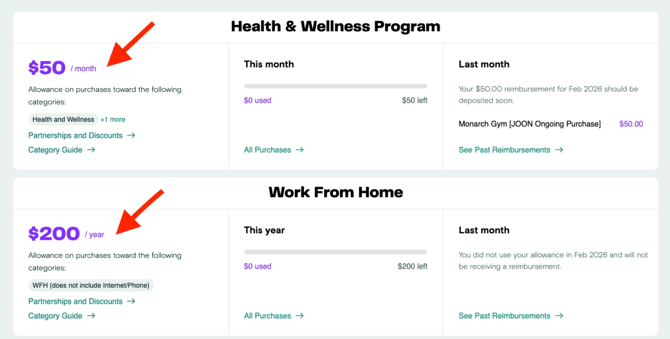
When you log into JOON, you’ll see the benefit program(s) you’re enrolled in.
Each program includes:
- A set allowance (could be monthly, quarterly, annual or a one-time allowance)
- Your company’s category guide with eligibility rules.
- Your category guide provides examples of eligible purchases - you’re not limited to specific vendors as long as the purchase meets your company’s eligibility rules.
You can view all of this directly from your JOON dashboard.
Step 3: Make Eligible Purchases
Once you know your available allowance and what’s eligible, make purchases by using your connected purchase card (recommended) or manually add them to your JOON dashboard to be reimbursed:
Connected Purchase Card
Make eligible purchases using your connected purchase card. JOON will then automatically mark purchases as eligible - no receipts or manual uploads required in most cases. This is the easiest and most hands-off way to use JOON.
Once a purchase is automatically marked as eligible:
- You will be notified via email
- It will count towards your allowance
Important Notes
- Not all eligible purchases will automatically be marked as eligible. For that reason, we recommend checking your account towards the end of the month.
- Note on category labels: Some categories in your company's category guide may be labeled (manual) or (receipts required). These categories are not eligible for automatic approval. You can still use your connected purchase card for these purchases, but you'll need to request an eligibility review and attach a receipt if your category is labeled (receipts required).
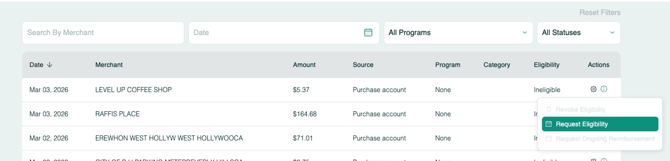
- If a purchase is not automatically marked as eligible, you can request an eligibility review
- How to Request an Eligibility Review
- Attach a Receipt if the merchant is a Big Box Retailer and/or the purchase can’t be easily identified(e.g. Amazon, Walmart, Target). JOON does not automatically validate purchases from Big Box Retailers.
- Once this request is submitted, JOON will review and mark it as eligible or ineligible within 3 business days. If marked as ineligible, you will receive an email with the reason why.
Manually add a purchase
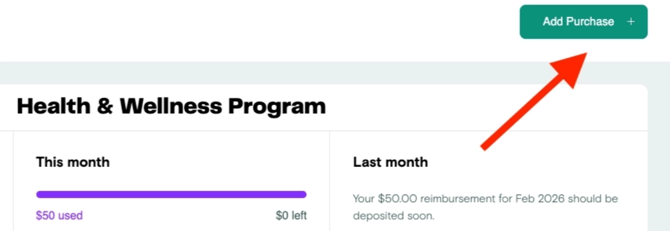
You can manually add a purchase to your account by uploading the purchase details and documentation.
- How to Manually Add a Purchase
- Manual submission are reviewed within ~3 business days. If marked as ineligible, you will receive an email with the reason why.
If you have eligible purchases that exceed your allowance:
- Reimbursements will be capped at your allowance for that period
- Excess spend will not roll over or be reimbursed later unless submitted as an ongoing reimbursement.
- for example, if your allowance is $50/month and you have $200 worth of eligible purchases in January, we will reimburse you $50 and you will need to submit new purchases in February.
- An ongoing reimbursement is a single purchase that exceeds your allowance and will continue to reimburse you each allowance period until the purchase is paid off.
Important submission timing
Purchases must be submitted during the same month the purchase was made.
- This applies even if your program is quarterly, annual or has rollover.
You have until the third business day after the month ends to submit purchases from the previous month unless noted otherwise on your category guide.
- i.e. For most employers, all January 2026 purchases must be submitted by February 4, 2026.
- Always check your Category Guide to verify submission date cutoff.
Step 4: View your purchases and reimbursements
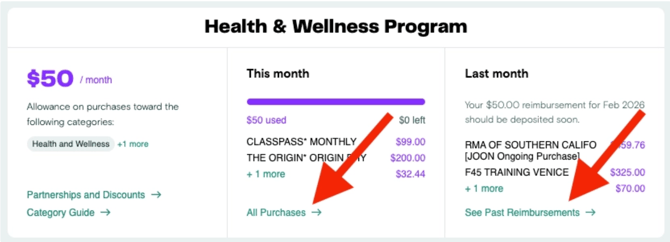
You can see all of your purchases and reimbursement activity in your JOON dashboard.
Here you’ll be able to:
- View remaining allowance
- View submitted and eligible purchases
- Check reimbursement status
- See past reimbursements
Note: Ineligible purchases are deleted and removed from your JOON dashboard after 60 days.
Step 5: Receive your reimbursement
Reimbursements are paid after the month closes and are typically deposited mid-to-late in the following month, once they’ve been approved.
- For example, January purchases are sent to your employer for review in the first week of February. Once they provide final approval, you can expect reimbursement by mid to late February.
A Few Things to Keep in Mind
- JOON is reimbursement-based — you must make an eligible purchase to use your allowance
- Unused funds may expire depending on your employer’s policy
- Eligibility rules are set by your employer and tax regulations